On this page
Help / Web portal
Billing
What the Billing page shows, and which orders count toward the monthly bill.
For: OwnerThe Billing page shows what your TotePath usage costs. It shows how many orders were processed, what they cost, and how the total builds up each month. The link appears only for owners.
Open the page
Click Billing in the top bar.
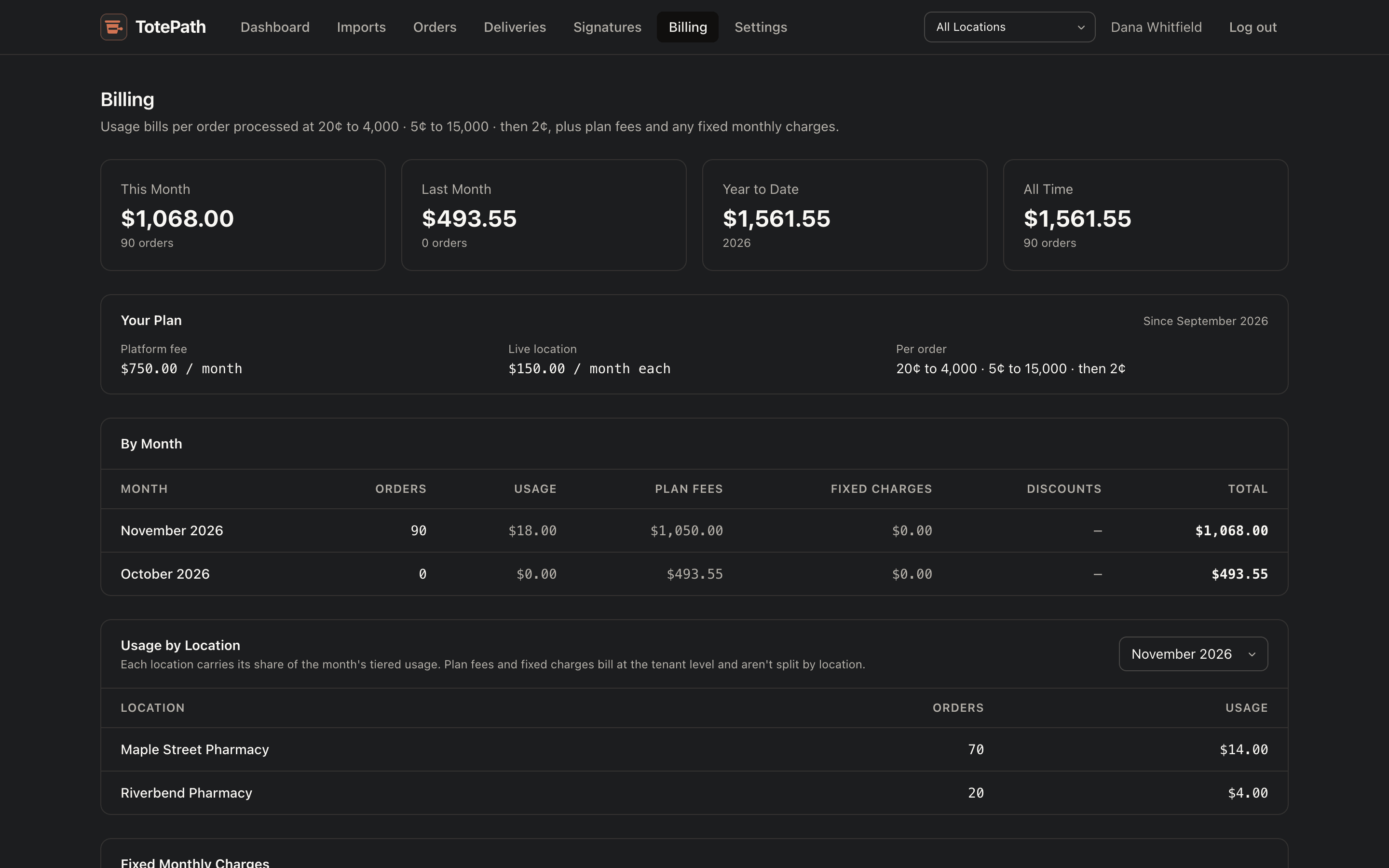
The heading line reads "Usage bills per order processed at" your rates, "plus plan fees and any fixed monthly charges."
What is on the page
Totals. Four tiles show an amount each: This Month, Last Month, Year to Date and All Time. Under the amount, This Month, Last Month and All Time show the number of orders. Year to Date shows the year. They fill in a moment after the page loads.
Your Plan. Shows your Platform fee per month, your Live location fee per month for each location, and your Per order rates, with a "Since" line saying which month the rates took effect.
By Month. One row per month with Orders, Usage, Plan Fees, Fixed Charges, Discounts and Total.
Usage by Location. Choose a month, or All Months, to see Orders and Usage per location. Each location carries its share of the month's tiered usage. Plan fees and fixed charges bill to your account as a whole and are not split by location.
Fixed Monthly Charges. Any set monthly amounts, with From, Through (or Ongoing) and Per Month.
Discounts. Shown only if you have any. Each has a percentage in Off and a date range. A discount comes off plan fees and per-order usage for the days it covers. It does not apply to fixed charges.
What counts as a billable order
An order is the billing unit. TotePath bills an order once it has been successfully processed, and only if it came from a live location and arrived after that location went live. These statuses count:
- Submitted
- Shipped
- Delivered
- Delivery failed
These do not count:
- Staged, because it has not been released yet.
- Deleted, removed at the station while still staged.
- Resolved, closed by hand.
- Failed, a release that did not go through.
Three more rules decide what you are billed:
- Only orders from live locations count, and only orders that arrived after the location went live. Orders received while a location was in testing never bill.
- An order bills in the month TotePath received it, not the month it was released or delivered.
- Only live locations count toward the per-location fee. It is prorated by the days each location was live, and the platform fee starts with your first live location. A location in testing mode or inactive does not count.
The per-order price is tiered, so the rate depends on how many orders are processed. The Per order line on Your Plan shows your tiers.
What you will see
A set of totals, your plan, and a month-by-month table. A new account may show "Nothing billed yet. Charges appear once a location goes live, a price schedule takes effect, or a fixed monthly charge starts."
If something goes wrong
The numbers look low. Check Usage by Location for the month. Orders that were never released, or were deleted or resolved, are not billed. Orders received before a location went live are not billed either, and an order bills in the month TotePath received it. A location that went live part way through a month is charged only for the days it was live. See Dashboard for how to check order statuses.
A location is missing from the fee. It may still be in testing mode. Only live locations count, and its fee is prorated from the day it went live.
"No orders processed in this period." There were no billable orders in the month you picked.
You cannot see Billing. The page is for owners. Ask your account owner.
A question about rates or a discount. Contact TotePath. You cannot change prices from this page.